Test a Rails app with Docker
Rails apps often run inside Docker in development and CI. Installing browser dependencies into that app image can make it large and fragile, especially with Alpine-based images. Smartest keeps the Rails test server in the Rails Ruby process and moves only Playwright's browser runtime into a sidecar container.
That means FactoryBot, ActiveRecord, Rails helpers, and Smartest method stubs still run in the test process, while the browser itself runs in the Playwright container.
This page focuses on Docker-specific concerns: the sidecar topology, the
network names that Rails and the browser must agree on, and the environment
variables that switch the generated fixture between local and remote
Playwright. For Rails-side concepts that are not Docker-specific — fixture
composition, around_suite registration, database cleanup strategy, parallel
execution, and troubleshooting — see
Test a Rails app locally.
Prerequisites
The examples on this page use web as the Rails Compose service name. If your
project uses a different service name, replace web in the commands and in
SMARTEST_RAILS_BASE_URL.
Add Smartest to the test group in the Rails app's Gemfile and rebuild the
image so the gem is available inside the app container:
docker compose run --rm web bundle add smartest --group test
docker compose build web
The Docker sidecar setup connects to the Playwright server over WebSocket.
websocket-driver is REQUIRED only when using PLAYWRIGHT_WS_ENDPOINT or
Playwright.connect_to_browser_server; local Rails browser tests that launch
Playwright locally do not need it.
docker compose run --rm web bundle add websocket-driver --group test
docker compose build web
Prepare the Rails databases. From your host shell, run the commands through Compose so they use the same image and database service as the test run:
docker compose run --rm web bin/rails db:prepare
docker compose run --rm web bin/rails db:test:prepare
On a fresh Rails app, db:prepare creates and migrates the app database first,
which also writes db/schema.rb or db/structure.sql. Then db:test:prepare
can load that schema into the test database.
Quick start
Generate the Rails browser-test scaffold without downloading browser binaries into the Rails app container:
docker compose run --rm -e SMARTEST_SKIP_BROWSER_DOWNLOAD=1 \
  web bundle exec smartest --init-rails
This still creates the Rails fixture, Playwright matcher, example test, Gemfile
entry, and Playwright npm package. It skips only
./node_modules/.bin/playwright install.
Put the Docker network wiring variables in Compose, as shown in the example below. Then run the suite:
docker compose run --rm --use-aliases \
  web bundle exec smartest smartest/
--use-aliases makes the one-off test container join the Compose network under
the web service name, so the Playwright sidecar can resolve
http://web:4001.
The generated Rails fixture forces RAILS_ENV and RACK_ENV to test before
loading config/environment, so the test run does not depend on the service's
development environment variables.
There is no separate --browser=docker or --skip-browser-install option. The
same generated fixture supports local and Docker runs through environment
variables.
Architecture
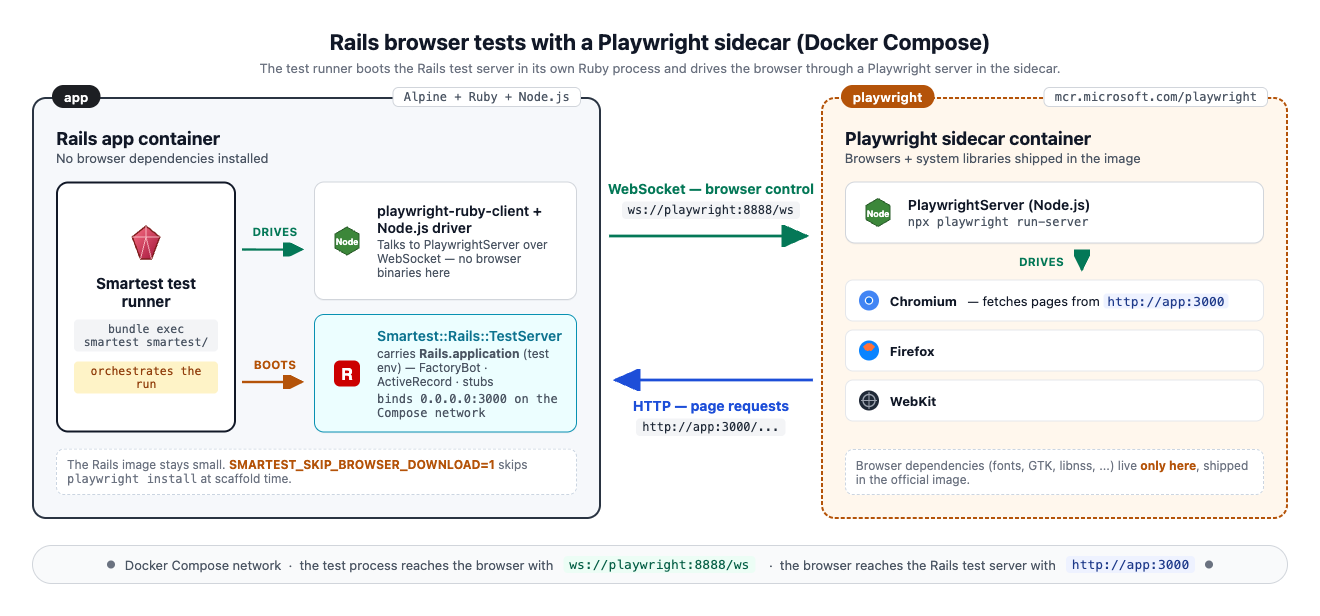
In the Rails app container:
- Smartest runs the test suite.
- Rails boots in
RAILS_ENV=test. Smartest::Rack::TestServerstartsRails.applicationin the same Ruby process.- Fixtures create records, install stubs, and prepare application state.
In the Playwright sidecar container:
- Playwright server listens on a WebSocket endpoint.
- Browser processes run with the dependencies from the official Playwright image.
Do not run Rails as a separate bin/rails server -e test process — neither
in another Compose service nor in the same container. Smartest fixtures
install method stubs in the test runner process, and those stubs are only
visible to the Rails server thread when both run in the same Ruby process.
The one-off docker compose run web bundle exec smartest ... command boots
Rails inside that test runner. Do not add a second service that runs
bin/rails server -e test against the same database.
Docker Compose example
Add the Playwright sidecar and the Smartest browser-test environment variables
to your existing Rails service. This is a diff against your current Compose
file, not a replacement file. Keep the service's normal development command
and RAILS_ENV unchanged if this file is also used for docker compose up.
 services:
   web:
     build: .
+    environment:
+      PLAYWRIGHT_WS_ENDPOINT: ws://playwright:8888/ws
+      SMARTEST_RAILS_TEST_SERVER_HOST: 0.0.0.0
+      SMARTEST_RAILS_TEST_SERVER_PORT: 4001
+      SMARTEST_RAILS_BASE_URL: http://web:4001
+
+      BROWSER: chromium
+      HEADLESS: "true"
+    depends_on:
+      - playwright
+
+  playwright:
+    image: mcr.microsoft.com/playwright:v1.59.0-noble
+    init: true
+    ipc: host
+    working_dir: /home/pwuser
+    user: pwuser
+    command: >
+      /bin/sh -c "npx -y playwright@1.59.0 run-server --port 8888 --host 0.0.0.0 --path /ws"
Use your own service name if it is not web; SMARTEST_RAILS_BASE_URL must use
the host name that the Playwright container can resolve on the Compose network.
Environment variables
| Variable | When used | Purpose |
|---|---|---|
SMARTEST_SKIP_BROWSER_DOWNLOAD | During --init-rails | Skip browser binary installation in the Rails app container. Set to 1 or true. |
PLAYWRIGHT_WS_ENDPOINT | During test execution | Connect the generated fixture to a remote Playwright server instead of starting local Playwright. |
SMARTEST_RAILS_TEST_SERVER_HOST | During test execution | Bind the Rails test server to a host visible from the Docker network. Use 0.0.0.0 for Compose sidecars. |
SMARTEST_RAILS_TEST_SERVER_PORT | During test execution | Use a fixed Rails test-server port. |
SMARTEST_RAILS_BASE_URL | During test execution | Set the URL that browser code uses as Playwright's baseURL. |
BROWSER | During test execution | Choose chromium, firefox, or webkit. |
HEADLESS | During test execution | Set 0 or false for headed local runs. |
SMARTEST_SKIP_BROWSER_DOWNLOAD and PLAYWRIGHT_WS_ENDPOINT are deliberately
separate. The first affects scaffold initialization; the second chooses remote
Playwright at test runtime.
For Docker sidecar runs, keep PLAYWRIGHT_WS_ENDPOINT and the
SMARTEST_RAILS_* network variables in Compose. The generated Rails fixture
sets RAILS_ENV and RACK_ENV to test before Rails boots.
Base URL for the Playwright sidecar
In local mode, 127.0.0.1 points at the machine running both Rails and the
browser.
In Docker sidecar mode, the browser runs inside the Playwright container. From
that browser's point of view, 127.0.0.1 is the Playwright container, not the
Rails app container.
Use all three Rails server variables together:
SMARTEST_RAILS_TEST_SERVER_HOST=0.0.0.0
SMARTEST_RAILS_TEST_SERVER_PORT=4001
SMARTEST_RAILS_BASE_URL=http://web:4001
The generated fixture binds Rails to 0.0.0.0, waits for readiness from inside
the app container, and gives Playwright http://web:4001 as the browser-visible
base URL.
Version matching
Keep the Playwright server version in the sidecar aligned with the version
expected by playwright-ruby-client in the Rails app container.
After bundle install, you can print the expected Playwright version from the Rails app container with:
docker compose run --rm -e BUNDLE_WITHOUT="" web \
  bundle exec ruby -rplaywright -e 'puts Playwright::COMPATIBLE_PLAYWRIGHT_VERSION'
The BUNDLE_WITHOUT="" override matters when your image excludes the test group
by default; playwright-ruby-client is installed in the test group by the Rails
scaffold.
Use that version in both the Docker image tag and the npx playwright@...
command when possible.
When local mode is simpler
Use the local setup from Test a Rails app locally when the Rails app runs directly on your development machine and installing browser dependencies there is acceptable. Docker sidecar mode is most useful when the Rails app itself already runs in Docker, the app image is Alpine-based, or CI should keep browser dependencies outside the Rails image.
Summary
Docker sidecar mode changes where the browser runs, not where Rails test state
lives. Smartest still starts Rails in the test process, fixtures still build
application state from Ruby, and Playwright still drives a real browser through
the generated page: fixture.